

Shop by Brand: Building Brand Pages That Convert
Shoppers search by brand more than by category. A good brand directory and landing pages capture that intent and lift a…
Turn any product attribute into a complete brand experience — a shoppable A to Z directory, brand landing pages, and a GraphQL API. One dataset, three storefronts.
Manage brands once in the admin. Render them wherever your store lives — the same read model powers every surface, so your data never drifts.
Server-rendered pages for native Magento themes — no build step, works out of the box.
Alpine.js + Tailwind templates that drop into a Hyvä theme and feel native to it.
A typed GraphQL API plus a Next.js reference storefront for PWA and composable builds.
No new entity to learn. Brands are options of a product attribute you already have, enriched with content and published in minutes.
Choose the attribute that holds the brand — brand, manufacturer, anything.
Logo, story, slider image, SEO and a clean URL — per brand, per store view.
Directory, brand pages, slider and product-page logo — on your chosen edition.
One command copies your brands, images and settings across — nothing to re-enter.
bin/magento setup:upgrade
Every touchpoint a shopper uses to find and trust a brand — ready on day one.
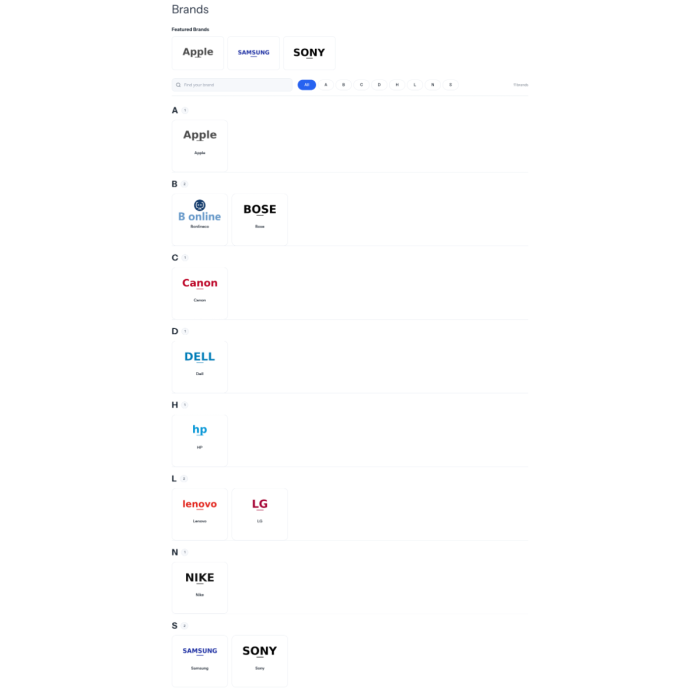
An all-brands page with an alphabetical index, live letter filter and instant search.
A branded header with logo and story, plus every product from that brand.
Spotlight the brands you want up front — hand-picked and ordered in the admin.
A cross-sell row on the product page that keeps shoppers inside a brand they trust.
The brand mark, linked, on product pages and category tiles — sized how you like.
Add a brand list or slider to any CMS page or block — no template edits needed.
A dedicated Content › Brands screen — no digging through attribute options. Edit content, curate the slider and control SEO in one place.
Five brand queries, a brand field on every product, and typed store config — everything a PWA or composable front end needs, shipped in the box.
{
  bonBrandList(showCount: true) {
    all_letters
    items {
      brand_id  label  url
      image  product_count
      letter  is_show_in_slider
    }
  }
}
{
  "all_letters": "A,B,C,E,…,أ,ب,#",
  "items": [
    {
      "brand_id": 218,
      "label": "Korkmaz",
      "url": "/brand/korkmaz",
      "product_count": 42,
      "letter": "K"
    }
  ]
}
Also included: bonBrand, bonBrandSlider, bonMoreFromBrand, bonAllBrandsPage, a bon_brand field on ProductInterface, and brand fields on storeConfig — with a ready-to-run Next.js reference storefront.
A built-in migration copies your existing brand content into Bonlineco and runs happily alongside the old extension until you're ready to switch it off.
bin/magento module:enable Bonlineco_Brand && bin/magento setup:upgrade
Set it up once, publish everywhere, and let shoppers browse by the brands they already love.
| Brand | Bonlineco |
|---|
From the journal
Shoppers search by brand more than by category. A good brand directory and landing pages capture that intent and lift a…

Canonical URLs, structured data, crawl budget and internal linking: a practical checklist we run on every Magento store…