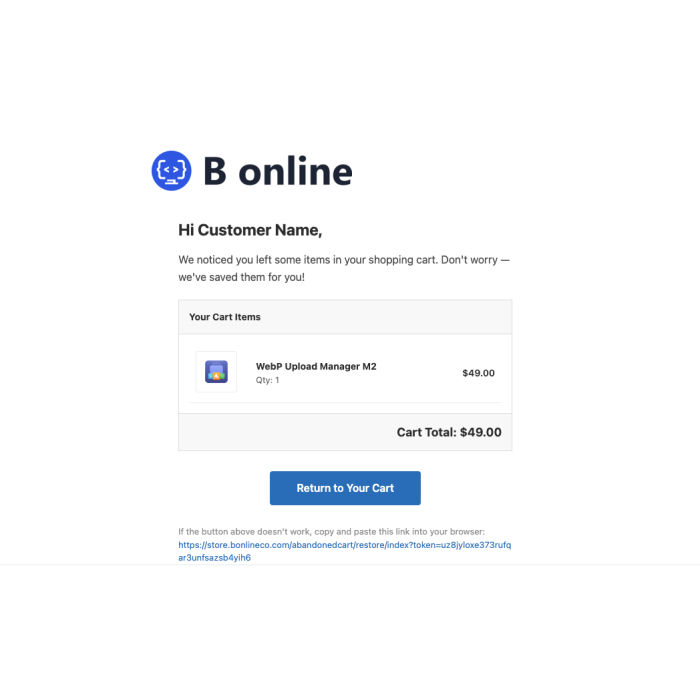
Recover lost revenue from abandoned carts with automated 3-step recovery emails, auto coupon generation, and a powerful admin dashboard for registered customers.
Bonlineco Abandoned Cart Recovery Pro for Magento 2
🛒 Recover Lost Revenue from Abandoned Carts 💰
Turn abandoned shopping carts into completed orders. Automatically detect abandoned carts from registered customers, send multi-step recovery emails with personalized product listings, generate unique coupon codes, and drive customers back to complete their purchase — all from a powerful admin dashboard.
🔄 How It Works
1
🛒
Customer Abandons Cart
A registered customer adds products to their cart but leaves without completing checkout.
2
⏰
Cron Detects Idle Carts
A scheduled cron job automatically identifies carts that have been idle past the configured threshold.
3
✉
Recovery Email Sent
A personalized recovery email is sent with product details and an optional discount coupon to bring them back.
4
✅
Customer Returns to Buy
The customer clicks the link in the email, logs into their account, and completes the purchase.
🔥 Core Features & Capabilities
✉
3-Step Email Sequence
Reminder email sent after 1 hour (configurable)
Discount offer email at 24 hours (configurable)
Final reminder email at 72 hours (configurable)
Each step has its own template and timing settings
🔗
Smart Recovery Links
Unique tokenized links for each abandoned cart
Single-use tokens for security
Configurable token expiry period
Seamless redirect back to checkout page
🎫
Auto Coupon Generation
Integrates with Magento Cart Price Rules
Unique coupon code generated per cart
Configurable coupon prefix and code length
Automatic expiry and usage limits
📊
Admin Dashboard & Grid
Dedicated guest abandoned cart report — fills Magento’s native gap
Summary totals for abandoned cart value, count, and items
Filterable and sortable grid with CSV export
Send recovery emails directly from Magento’s native Abandoned Carts report
🔍
Cart Detail View
Product thumbnails, names, and SKUs
Quantity and individual item prices
Complete email history per cart
Cart status and recovery tracking
⚙
Full Admin Configuration
Stores > Configuration panel for all settings
Per-step email timing, template, and subject
Cron schedule and idle threshold settings
Sender identity and email branding options
✉ Recovery Email Flow
✉
Step 1
Friendly Reminder
⏰ Sent after 1 hour
A gentle reminder with product images and a link back to their cart. No discount yet — many customers just need a nudge.
🎫
Step 2
Discount Offer
⏰ Sent after 24 hours
Includes an auto-generated unique coupon code to incentivize the purchase. Coupon amount and type fully configurable.
🔔
Step 3
Final Reminder
⏰ Sent after 72 hours
A last-chance email with urgency messaging. Creates a sense of scarcity to drive the final conversion before the cart expires.
🏆 Why Choose Abandoned Cart Recovery Pro?
Recover Lost Revenue
Automated recovery with no manual effort
Multi-step emails increase conversion rates
Track recovered revenue in admin dashboard
Coupon incentives drive hesitant buyers
Customer-Focused Recovery
Targets registered customer abandoned carts
Leverages customer email for reliable delivery
Email capture from quote billing address
No customer account required
Complete Visibility
Admin grid with full abandoned cart data
Summary statistics and conversion metrics
Full email history per abandoned cart
CSV export for external analysis
Easy Setup
Install and configure in minutes
No code changes or theme modifications
Works with any Magento 2 theme
Sensible defaults for immediate use
✉ Interactive Recovery Email Demo
See how a recovery email looks to your customers:
🛒 You left something behind!
Hi there! You left some great items in your cart. We’ve saved them for you — come back and complete your purchase.
📦
Premium Wireless Headphones
Qty: 1
$79.99
Return to My Cart →
🔒 Automated & personalized — Powered by cron
This is a visual demo only. No actual email is sent.
⚙️ Technical Specifications
Magento Version: 2.4.x compatible
PHP Support: 8.1+ through 8.3
Dependencies: No external dependencies
Installation: Composer or manual
Themes: Compatible with all themes
Multi-store: Full multi-website support
Database: Declarative DB schema
Automation: Cron-based email scheduling
Emails: Magento TransportBuilder
Coupons: Cart Price Rule integration
Recovery Links: Direct links back to store
Logging: Custom debug logging
📖 Documentation
Full installation guide, configuration reference, email template customization, cron setup, and troubleshooting available in our documentation centre.